
A Platform Event Trap can describe a situation in which an application becomes stuck, behaves unexpectedly, or fails to process events correctly because of problems in its event-handling workflow. The exact meaning depends on the software or development environment in which the term is used. In Salesforce and other event-driven systems, developers may encounter related problems involving event subscriptions, triggers, message delivery, processing limits, and asynchronous execution. Understanding these issues is essential for building reliable applications that respond to events without losing important information or creating repeated processing loops.
Platform events help different components communicate without requiring every operation to happen at the same time. However, when event publishers, subscribers, and processing logic are not configured correctly, applications can experience delays, duplicate actions, errors, or unexpected behavior. This guide explains the meaning of a Platform Event Trap, its possible causes, common warning signs, troubleshooting methods, and practical ways to improve event handling. Because the phrase is not a universally standardized technical term, the discussion focuses on common event-processing problems rather than treating it as the official name of a particular error.
What Is a Platform Event Trap?
A Platform Event Trap generally refers to a problem pattern in which an application becomes caught in an event-processing issue. For example, an event handler might repeatedly trigger another event, a subscriber might fail to complete its work, or an application might appear unresponsive while waiting for an expected message. In Salesforce, platform events are a specific mechanism for communicating changes and business activities between different parts of an application. The phrase “Platform Event Trap” should not automatically be interpreted as a named Salesforce error. Instead, it can be used informally to describe difficulties that arise when event-driven logic behaves incorrectly. Recognizing this distinction helps developers investigate the actual technical cause rather than searching for a single universal fix.
How Platform Events Work
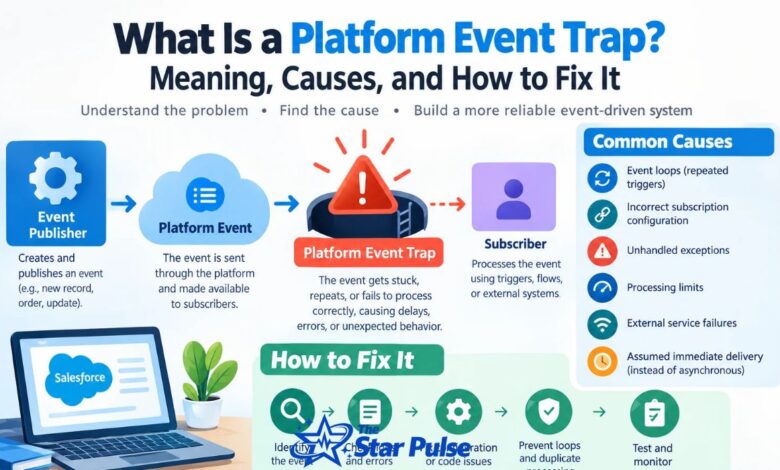
Platform events allow applications to exchange messages through an event-driven architecture. A publisher creates an event when something important happens, such as an order being submitted or a customer record being updated. The event is then made available to subscribers that have registered to receive it. In Salesforce, developers can create custom platform events and process them using Apex triggers, flows, or external integrations. This approach reduces the need for tightly connected systems and allows different components to perform tasks independently. However, developers must understand event delivery behavior, subscription settings, and transaction boundaries to prevent processing problems. A misunderstanding of these mechanisms can create the kind of situation informally described as a Platform Event Trap.
Common Causes of a Platform Event Trap
Several technical problems can create platform event processing difficulties. One common cause is an event loop, where processing one event generates another event that repeats the same workflow. Incorrect subscription configuration can also prevent a subscriber from receiving the expected messages. Other causes include unhandled exceptions, exhausted processing limits, inefficient queries, and poorly designed integration logic. In some situations, developers expect an event to be delivered immediately even though asynchronous processing introduces delays. Network interruptions and external service failures may also affect integrations. The most effective troubleshooting approach is to identify where the event lifecycle breaks down, rather than assuming every failure has the same underlying cause.
Common Warning Signs and Symptoms
A Platform Event Trap may be suspected when an application repeatedly performs the same action, processes messages more slowly than expected, or fails to complete a business workflow. Other warning signs include missing downstream updates, repeated notifications, subscriber errors, and increasing processing backlogs. For example, an order confirmation service might receive an event but fail while contacting an external system, leaving the order workflow incomplete. Developers may also notice unexpected API activity or repeated execution of automation. These symptoms do not prove that an event trap exists, because they can result from unrelated application problems. Checking logs, timestamps, transaction outcomes, and subscriber behavior helps establish whether the issue originates in event processing.
Platform Event Trap in Salesforce
Salesforce is an important environment to consider because platform events are a built-in feature of its event-driven architecture. They allow Salesforce applications and external systems to exchange business messages without requiring direct, synchronous communication for every task. Apex triggers can respond to platform events, while integrations can subscribe through supported event messaging mechanisms. Problems may arise when triggers perform excessive work, subscribers are misconfigured, or event-processing assumptions do not match the platform’s delivery behavior. Developers should also distinguish platform events from ordinary record-triggered automation and change data capture events, because each serves different purposes. Reviewing Salesforce documentation for the specific event type and subscription mechanism is essential before applying a solution.
How to Fix a Platform Event Trap
Start by reproducing the problem in a controlled environment and identifying the event involved. Determine which component publishes the message, which subscriber receives it, and what happens during processing. Examine application logs and error messages for failed transactions, repeated execution, or unexpected delays. If the same event repeatedly triggers another event, review the publishing logic and introduce safeguards against unnecessary repetition. If processing fails because of an exception, correct the underlying error and handle expected failures appropriately. For Salesforce applications, inspect Apex debug logs, relevant automation, and event subscription configuration. Make one change at a time and test the complete workflow so that a local fix does not create a different problem elsewhere.
Preventing Repeated Event Loops
Event loops can occur when a subscriber performs an action that publishes another event, which then activates the same subscriber or another component that repeats the original action. A practical solution is to design clear boundaries between event producers and consumers. Use event types that represent meaningful business changes, and avoid publishing new events when no relevant state change has occurred. Where appropriate, include a correlation identifier to connect related operations and help identify repeated processing. Idempotency controls can prevent a message from producing the same business effect more than once. Developers should not rely exclusively on a simple Boolean flag, because concurrent transactions and distributed systems may require more robust safeguards.
Event Subscription and Delivery Problems
A subscriber cannot process messages it does not receive, so subscription problems deserve careful investigation. Verify that the consumer uses the correct event channel, has the required access, and follows the platform’s supported subscription process. Check whether the consumer has disconnected, restarted incorrectly, or failed to resume from its intended position. Event retention and replay capabilities vary by platform and event mechanism, so developers should confirm the applicable limits rather than assume every missed message can be recovered. In Salesforce, review the relevant Pub/Sub API or other supported subscription method and its error responses. Monitoring subscription health and documenting recovery procedures can reduce disruption when consumers temporarily become unavailable.
Debugging and Monitoring Techniques
Effective monitoring makes Platform Event Trap troubleshooting faster and more accurate. Record important information such as event identifiers, correlation identifiers, processing timestamps, consumer status, and error details. Use these details to trace a message from publication through subscription and final processing. In Salesforce, Apex debug logs and available monitoring tools can help identify failures in event-triggered logic. External consumers should maintain structured application logs and monitor message-processing latency, failure rates, and queue or subscription health where supported. Avoid logging passwords, access tokens, or unnecessary personal information. Alerts should focus on meaningful conditions, such as sustained processing delays or repeated failures, rather than every isolated error. Good observability helps teams detect emerging issues before they affect users.
Platform Event Trap Best Practices
Reliable event-driven applications depend on simple, well-defined processing rules. Keep event payloads focused on information that subscribers actually need, and validate incoming data before performing important operations. Make handlers idempotent wherever duplicate delivery or repeated execution could cause harmful side effects. Separate temporary failures from permanent errors and use appropriate retry strategies for recoverable problems. Retries should include limits and, where suitable, backoff to avoid overwhelming an unavailable service. Developers should also respect platform-specific execution limits and avoid expensive operations inside high-volume event handlers. Document event ownership, expected consumers, and failure recovery procedures. These practices improve reliability without assuming that every event-processing problem can be prevented completely.
Testing Platform Event Processing
Testing should cover normal operation as well as failure scenarios. Verify that publishing an event produces the expected business result, that subscribers handle valid payloads correctly, and that invalid data does not cause uncontrolled processing. Test repeated messages to determine whether the application creates duplicate records, sends duplicate notifications, or performs the same payment or update twice. Simulate temporary dependency failures and confirm that recovery procedures work as intended. In Salesforce, use appropriate Apex tests and the platform’s supported event-testing patterns, while recognizing that test execution does not necessarily reproduce every production delivery condition. Integration tests should also examine permissions, subscription reconnection, and realistic processing volumes. A repeatable test suite makes future changes safer.
Platform Event Trap vs. Event-Driven Architecture
Event-driven architecture is a software design approach in which components communicate through events rather than depending entirely on direct requests. A Platform Event Trap, by contrast, is an informal description of a potential problem within an event-processing workflow. The two terms are not equivalent. Event-driven architecture can improve scalability, flexibility, and integration between systems, but it also introduces challenges involving asynchronous execution, message ordering, duplicate handling, and failure recovery. Understanding these trade-offs helps developers distinguish an architectural feature from a malfunction. The goal is not to avoid event-driven systems but to design them with clear ownership, appropriate monitoring, controlled retries, and reliable handling of business operations.
When to Seek Advanced Troubleshooting
If the problem continues after basic checks, investigate transaction boundaries, concurrency, external dependencies, and platform-specific limitations. Review whether multiple subscribers are responding to the same event and whether one subscriber’s actions affect another’s behavior. Compare successful and unsuccessful event traces to identify differences in payloads, permissions, timing, or execution paths. For Salesforce implementations, consult official documentation and release-specific guidance when investigating delivery guarantees, replay behavior, API limits, and supported event features. If the issue affects critical business processes, involve an experienced developer or platform administrator before making broad production changes. A carefully documented incident report, including timestamps and sanitized logs, can make advanced diagnosis much more efficient.
Final Thoughts
A Platform Event Trap is best understood as an informal label for problems that can occur in event-driven applications, rather than a universally recognized error with one standard solution. Repeated event loops, subscription failures, unhandled exceptions, and processing delays can all create similar symptoms. The right response is to trace the event lifecycle, inspect relevant logs, identify the actual failure, and test a targeted correction.
For Salesforce developers and integration teams, prevention is equally important. Reliable event handlers, idempotent operations, sensible retry policies, subscription monitoring, and comprehensive testing help keep applications stable. By combining these practices with platform-specific documentation, developers can troubleshoot event-processing issues more confidently and build systems that remain dependable as workloads grow.
FAQs
1. What is a Platform Event Trap?
A Platform Event Trap is an informal term for an event-processing problem, such as a repeated event loop, a failed subscriber, or a workflow that becomes stuck. It is not a universally standardized error name. The exact cause depends on the software platform and the behavior being observed.
2. What causes Platform Event Trap problems?
Common causes include incorrect subscription settings, unhandled exceptions, repeated event publishing, processing limits, and external service failures. Incorrect assumptions about asynchronous delivery can also contribute. Reviewing logs and tracing the event from publisher to subscriber helps identify the actual cause.
3. How can I fix a Platform Event Trap?
Identify the affected event, inspect publisher and subscriber behavior, and examine relevant logs for errors or repeated execution. Correct configuration issues, handle exceptions properly, and prevent unnecessary event loops. Test the complete workflow in a safe environment before deploying changes to production.
4. Is Platform Event Trap related to Salesforce?
It can refer to problems involving Salesforce platform events, Apex triggers, event subscriptions, or integrations. However, the phrase itself is not necessarily an official Salesforce error. Developers should use the specific error message, event mechanism, and documented platform behavior to determine the appropriate solution.
5. How can I prevent Platform Event Trap errors?
Use clear event-processing rules, idempotent handlers, appropriate retry limits, structured logging, and subscription monitoring. Test duplicate messages and temporary failures before deployment. Regularly review execution limits and integration health to detect problems early and reduce the risk of repeated processing or incomplete workflows.